
Sculpting Software for Beginners: Blender vs Nomad Sculpt
Learn how to choose the right sculpting software for beginners by comparing Blender and Nomad Sculpt features, ease of use, and workflow fit.
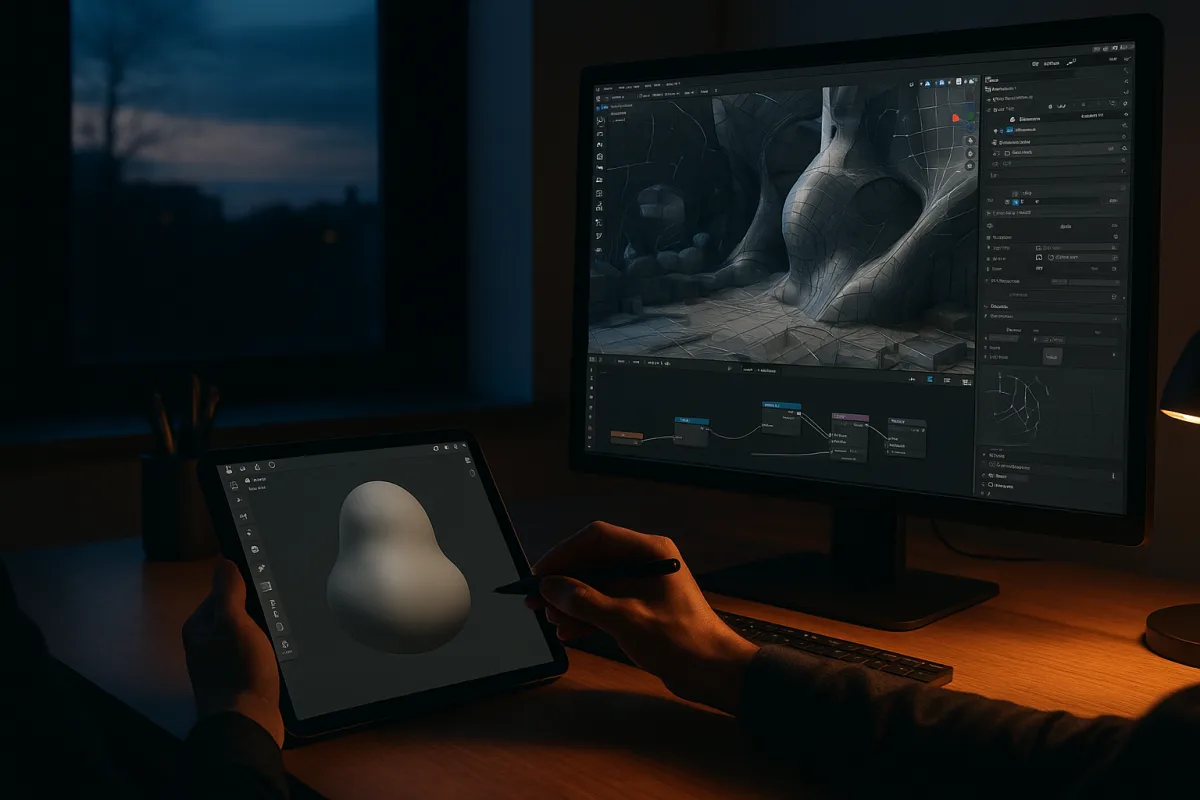
The decision: Blender 4.5 LTS or Nomad Sculpt?
For a first sculpting tool, I would narrow the decision to Blender 4.5 LTS versus Nomad Sculpt. They represent two genuinely different starting points: a complete desktop 3D package and a mobile-first digital clay application.
This is not really a contest over which has the better sculpt brush. A beginner needs to decide whether the first problem is learning sculptural form, or learning how a finished 3D asset moves through a wider pipeline.
Blender is free, open source and unusually broad. Its sculpting workspace sits alongside polygon modeling, UV unwrapping, texture painting, materials, lighting, rendering, animation and video tools. Creative Bloq identifies that all-in-one scope as Blender’s central advantage for learners. [4]
Nomad Sculpt is more focused. Its workflow centres on making and reshaping a digital volume with dynamic topology, voxel remeshing and PBR vertex painting, particularly on touch devices with a pressure-sensitive stylus. [3] [9]
That focus matters. When an interface shows fewer adjacent disciplines, a beginner can spend more attention on the actual sculpting questions: is the head too wide, does the shoulder connect convincingly, and does the silhouette still read when viewed small?
The same criteria, in the same order
This comparison concerns Blender 4.5 LTS and current Nomad Sculpt builds. The research brief does not identify a specific Nomad version, so it would be false precision to attach one here.
| Criterion | Blender 4.5 LTS | Nomad Sculpt |
|---|---|---|
| First-session clarity | Broad interface and many adjacent workflows can overwhelm a new user. | More focused, mobile-first sculpting environment, generally the clearer entry point. |
| Core sculpting approach | Capable sculpting tools inside a full DCC application, with more to learn around them. | Dynamic topology and voxel remeshing support direct clay-style experimentation. [[9]](https://nomadsculpt.com/manual/gettingstarted?utm_source=openai "Getting Started |
| Learning commitment | Expect a real ramp-up, not an instant result. Basic Blender familiarity is commonly estimated in weeks, while intermediate capability takes months. [[17]](https://howlongfor.com/technology/learn-blender?utm_source=openai "How Long Does It Take to Learn Blender? (2025 Guide) | HowLongFor.com") |
| Device and hardware fit | Desktop-oriented, with relatively demanding recommended hardware for comfortable work. [7] | Best suited to recent iOS or Android tablets with pressure-sensitive stylus support, and also available on desktop. [[9]](https://nomadsculpt.com/manual/gettingstarted?utm_source=openai "Getting Started |
| Modeling beyond sculpting | Includes conventional modeling, useful when a sculpt needs controlled hard edges, clean parts or manufacturable geometry. | Primarily a sculpting tool, so it is less suited to projects that begin with precise construction modeling. |
| Retopology and production handoff | Better placed for a full asset workflow because modeling, UVs and scene work live in the same application. | A useful sculpting starting point, but a complete game, animation or product workflow usually needs another application afterward. |
| Texturing | Offers texture painting and material work within the same package. [4] | Includes PBR vertex painting, but does not provide an integrated conventional texturing and rendering workflow. [[3]](https://illustrarch.com/articles/design-softwares/93842-nomad-sculpt-review.html?utm_source=openai "Nomad Sculpt Review: Can Sculptors and Architects Use It Together? |
| Lighting and final rendering | Includes lighting and rendering, allowing beginners to learn how form reads under controlled light. [4] | Falls down here. Finished presentation generally requires moving the model to another tool. |
| Cost position | Free, making it the lowest-cost route to an all-in-one desktop workflow. | A paid one-time purchase, but positioned as a lower-cost dedicated sculpting option rather than a premium suite. |
| Best first project | A simple prop, stylised character or creature that you want to finish, shade and render in one application. | Heads, creatures, toys, maquettes and loose organic studies where hands-on sculpting is the point. |
| Main limitation | Too much application can get in the way of learning the one discipline you came for. | Its streamlined sculpting experience becomes a limitation when you need full texturing, lighting, rendering or production-ready asset preparation. |
First-session clarity: Nomad Sculpt wins
A beginner often mistakes interface density for capability. It is capability, eventually. On day one, though, every panel that has nothing to do with your current shape can become another reason to stop working.
Blender 4.5 LTS asks a new user to enter a complete 3D environment. Sculpting is only one workspace among many, and the application’s general-purpose design means concepts such as objects, modes, modifiers, collections, materials and render engines sit nearby.
None of that is bad design. It is the price of a package that can carry a project from a rough blockout to an animated, lit render. But it makes Blender a less gentle first tool than its free licence might suggest.
Nomad Sculpt puts the clay experience closer to the front. Its dynamic topology and voxel remeshing tools support the early beginner instinct to pull, add, smooth and cut without first building a carefully planned mesh. [9]
That can be exactly right for a first creature or head. It lets the learner discover an important sculpting truth: large volumes and a readable silhouette matter more than detailed surface noise.
This is also where I would call a common habit what it is, not a rule. Starting from a sphere is useful because it removes technical friction, but it does not teach anatomy or design automatically. A well-observed box can produce a better character than a poorly observed sphere.
Sculpting depth: closer than the interface suggests
Neither option makes the fundamentals optional. Both can produce a dense mesh with an impressive amount of visible detail. Neither can repair weak proportions merely by adding more resolution.
The useful question is how soon the software makes you think about mesh management. Nomad Sculpt’s remeshing-led approach is forgiving while you are discovering a shape. It is therefore the better choice for loose organic exploration. [3] [9]
Blender can also support sculpting, but its value grows when the project needs to move beyond spontaneous clay work. You can combine a conventional modeled base with sculpted damage, fabric folds or organic transitions, then stay in the same application to prepare the rest.
That matters for hard-surface-adjacent work. If you are sculpting a stylised robot, a helmet or a creature with manufactured armour, controlled topology and ordinary polygon modeling are not chores imposed after the fun. They are often the cleanest way to make the forms.
The workflow question: Blender wins
A sculpt is not always an asset. If you only want to make a digital maquette, render a turntable elsewhere, or use sculpting as sketching, Nomad Sculpt’s narrower workflow is not a defect.
If the goal is a game-ready character, an animation model or a portfolio piece with intentional materials and lighting, the missing pieces arrive quickly. You need to consider retopology, UVs, texture maps, shaders, lighting and rendering.
Blender’s advantage is that those stages can happen under one roof. Its comprehensive toolset includes modeling, texturing, lighting and rendering as well as sculpting. [4] A beginner can learn them gradually rather than exporting the first sculpt immediately.
That said, an all-in-one workflow is not automatically the fastest workflow. A learner who wants to study creature anatomy may do better spending a month in Nomad Sculpt, then exporting only when there is a real need for retopology or final presentation.
Nomad Sculpt’s PBR vertex painting is useful for colouring a sculpt directly, but vertex colour is not the same thing as a conventional texture-map pipeline. The distinction becomes important when assets must be reused, baked, painted in layers or delivered to another renderer. [3]
Hardware and device choice can decide it for you
Blender is a desktop application first. Its published requirements and recommendations reflect that, with stronger hardware making a substantial difference to sculpting responsiveness and rendering comfort. [7]
There is also a forward-looking compatibility issue for Mac users. The research brief notes that support for older hardware and operating systems ends with Blender 4.5 LTS, while Blender 5.0 onward requires Apple Silicon and macOS 13 or later.
That does not mean Blender 4.5 LTS suddenly fails on every older computer. It means a beginner buying or keeping an older Intel Mac should check the relevant Blender requirements before treating Blender as a long-term default. [7]
Nomad Sculpt is the more natural fit for a recent tablet and stylus. It is available across iOS, Android and desktop, with its mobile design being the reason it is regularly positioned as an iPad sculpting choice. [3] [9]
A tablet is not inherently less serious. For organic form study, direct stylus control can be more immediate than mouse input. The limitation is what comes after the sculpt, particularly if the project needs detailed texture work and polished rendering.
Cost without the misleading sticker-price comparison
Blender is free, which removes the financial barrier to trying a complete 3D workflow. That makes it the clear entry-level value choice for someone with a capable computer and curiosity about modeling, rendering or animation beyond sculpting. [4]
Nomad Sculpt uses a one-time purchase model and is positioned as a relatively affordable paid tool. Platform pricing differs between mobile and desktop releases, so it is worth checking the current store listing for the device you actually intend to use. [6]
The more expensive applications in the wider field are not necessarily better beginner purchases. They often solve later, more specialised problems, and paying for advanced depth before understanding your own direction is rarely efficient.
Where the rest of the field sits
ZBrushCoreMini by Pixologic is a no-cost, simplified organic sculpting entry point. It suits newcomers who specifically want the ZBrush-style approach without committing to the full professional package, although simplified does not necessarily mean effortless. [19]
Sculptris by Pixologic is another no-cost, intuitive option for fast early organic experimentation. WifiTalents positions it as an inexpensive entry for rapid sculpt iteration, so it suits short-form studies rather than someone seeking a current all-in-one pipeline. [20]
3DCoat is a mid-range step for artists who have moved beyond first experiments and need sculpting alongside serious texturing and detailing. It suits intermediate workflows, including Linux users, better than it suits a beginner who only needs to learn basic form. [20]
Autodesk Mudbox also sits in the mid-range field. It suits character and prop artists who want a sculpt-first route toward texture-ready outputs, rather than learners choosing their first casual digital-clay application. [20]
ZBrush by Pixologic is a premium specialist tool for advanced character, creature and detailed hard-surface sculpting. It suits artists who need deep surface control and rapid high-detail iteration, but its interface and scope make it a later choice, not the automatic beginner winner. [20]
Adobe Substance 3D Modeler is a premium option for artists building around Substance tools and a sculpt-to-PBR workflow. It supports VR and signed-distance-field modeling approaches, which are useful specialisms but not a reason to skip fundamental form training. [12]
LightWave 3D is a premium, broad 3D package rather than a first dedicated sculpting choice. Creative Bloq highlights its 2026 features for rigging, procedural lightning and ocean simulation, which suit versatile modeling, animation and rendering work. [4]
SideFX Houdini is premium, procedural and particularly suited to VFX-minded artists. Its node-based approach is powerful for repeatable systems, but its steep learning curve makes it a poor substitute for simply learning how to sculpt a convincing face. [4]
Marmoset Toolbag is premium and suits real-time presentation and baking for 3D assets. It is valuable when a finished model needs polished showcase renders, but it is not a sculpting package and therefore cannot replace Blender or Nomad Sculpt. [4]
Plasticity is a premium modern modeling tool focused on a streamlined, efficient construction workflow. It suits clean hard-surface design and precise forms, not beginners whose first priority is pushing organic clay into creatures, faces or fabric. [4]
Who each option suits
Blender 4.5 LTS suits
Choose Blender 4.5 LTS if you have a reasonably capable desktop computer and want to learn more than sculpting. It is the better first choice for someone who expects to model props, retopologise sculpts, make UVs, paint textures, light scenes and render finished work.
It also suits the patient beginner. The early interface friction pays back when your project changes direction, because Blender can handle the next stage without immediately requiring a second application or a new subscription.
Avoid choosing it solely because it is free. If its general-purpose interface makes you spend more time managing windows than studying shape, free software has still cost you time.
Nomad Sculpt suits
Choose Nomad Sculpt if you own a recent stylus-equipped tablet and want the most direct route into organic digital sculpting. It is especially appropriate for heads, creatures, figurines, stylised characters and daily form studies where rapid visual feedback matters.
It also suits the learner who wants to separate craft from pipeline. Learn silhouette, gesture, plane changes and visual hierarchy first, then add retopology, UVs and rendering tools once a project genuinely demands them.
Do not choose it expecting a complete finishing suite. Nomad Sculpt is strongest as the sculpting stage of a broader workflow, not as the only application for every asset you may eventually want to deliver.
Frequently Asked Questions
Which sculpting software is best for beginners?
For beginners, the choice depends on the learning goals and hardware. Nomad Sculpt is generally more approachable for those focused on learning sculptural form on tablets or lightweight setups. Blender 4.5 LTS suits beginners willing to invest time in a full 3D production pipeline on desktop, despite its steeper learning curve.
What are the differences between Blender and Nomad Sculpt for beginners?
Blender is a comprehensive desktop application offering sculpting alongside modeling, texturing, lighting, and rendering, but its broad scope can overwhelm new users. Nomad Sculpt is a focused, mobile-first app designed for hands-on sculpting with dynamic topology, making it clearer and faster to start but lacking integrated texturing and rendering workflows.
Is Blender good for beginner sculptors?
Blender is powerful and free, making it a valuable tool for beginners who want an all-in-one solution. However, its extensive features create a steep initial learning curve, and it typically takes weeks to gain basic familiarity, so it may not be the easiest starting point for absolute beginners.
Can beginners use Nomad Sculpt effectively?
Yes, Nomad Sculpt is designed to be accessible for beginners, especially on tablets with pressure-sensitive stylus support. Its streamlined interface and focused sculpting tools help users concentrate on form and silhouette without distraction, although users will need other software for texturing and rendering.
What should beginners consider when choosing sculpting software?
Beginners should consider their hardware, desired workflow, and learning commitment. If they want a complete production pipeline on desktop and are ready for a longer learning period, Blender is suitable. If they prefer a quicker, more focused sculpting experience on mobile or lightweight devices, Nomad Sculpt is a better fit, keeping in mind its limitations in texturing and rendering.
How we researched this
This article was assembled from 22 cited references.
Nothing here is based on hands-on testing. Where a figure or finding appears, it belongs to the source cited beside it, and the writing says so rather than implying otherwise. Every source is listed below so you can check it.
Sources
- Re:Form vs Blender for Sculpting (2026) — Re:Form Blog
- ZBrush vs. Blender Sculpting — Wiki | Lazi Akademie
- Nomad Sculpt Review: Can Sculptors and Architects Use It Together? | illustrarch
- The best 3D modelling software in 2026
- Nomad Sculpt vs Substance 3D Designer (2026) - Softwr
- Nomad Sculpt Review (2026): Pricing, Pros & Cons
- Requirements — Blender
- Hardware Recommendations for ZBrush | Puget Systems
- Getting Started | Nomad
- Everything New in Blender 4.3 - CG Cookie
- Do's and Don'ts when Sculpting | Pablander Academy
- Substance 3D Modeler
- Top 10 Best Sculpt 3D Software | Independently Tested 2026
- Blender Review 2026: Free 3D Software That Replaces Maya and Cinema 4D
- Blender Review 2026: Is It a Good Brand? | Zen Tech Hub
- Is Blender Actually the Best 3D Modeling Software?
- How Long Does It Take to Learn Blender? (2025 Guide) | HowLongFor.com
- Nomad Sculpt Crash Course for Beginners!
- ZBrushCoreMini by Pixologic
- Sculptris by Pixologic
- 3D Modeling Tools 2026 — Blender 4.4 / Houdini 21 / Maya / ZBrush / Substance / USD / 3D AI Deep Dive — LabHub Blog
- Move and Drag tool have no independent radius - Bug Report - Nomad Sculpt
Related Articles
Sculpting in Blender for Beginners
Learn sculpting in Blender for beginners with key brushes, workspace setup, and dynamic topology tips to start your 3D sculpting journey.
Blender Safety Tips for Beginners
Learn essential Blender safety tips for beginners on ergonomics, data backup, hardware care, and digital security to work safely and efficiently.
Blender 5 Beginner Tutorial Series: Learn 3D Modeling Basics
Explore a Blender 5 beginner tutorial series that teaches 3D modeling, topology, lighting, and rendering with a focus on workflow dependencies.
Blender Tips for Creating Landscapes
Learn Blender tips for creating landscapes, including sculpting, resolution management, and using Geometry Nodes for natural detail.