
Best Hardware Specs for High Poly Sculpting in 2026
Discover the best hardware specs for high poly sculpting, including CPU, GPU, RAM, and storage recommendations for Blender and ZBrush workflows.
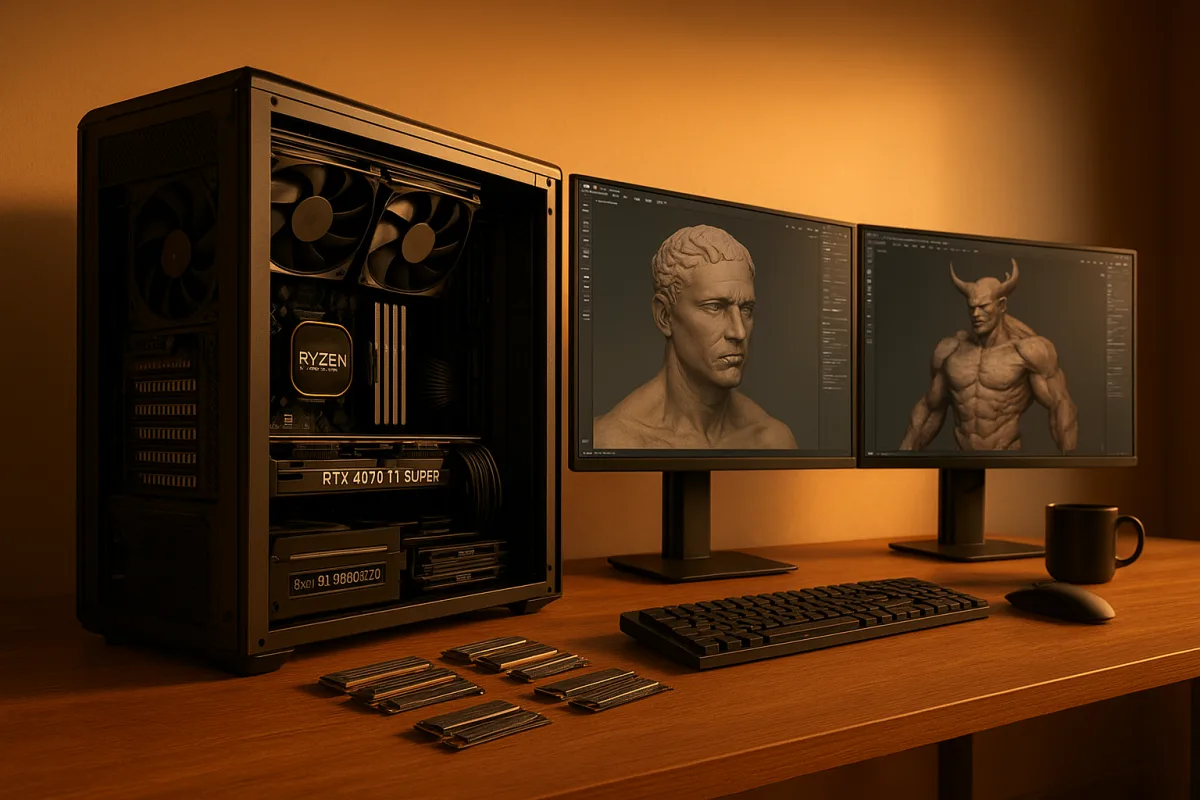
The decision: a balanced sculpting workstation or a rendering workstation
For a sculptor buying one desktop in 2026, I would choose the balanced Ryzen 9 9950X3D and RTX 4070 Ti Super configuration over the Threadripper 7980X and RTX 5090 machine.
That is not because the Threadripper system is weak. It is a much stronger compute workstation for CPU rendering. It falls down only when its expensive core count is mistaken for the thing that makes a sculpt brush feel immediate.
The comparison concerns high-poly work in Blender and ZBrush. The research brief does not identify exact application release numbers, so this is not a claim about one particular Blender or ZBrush build, nor a substitute for checking current vendor compatibility lists.
I have not physically tested either configuration. This recommendation follows the reported hardware behaviour in the research brief: CPU and system memory drive much of ZBrush-style sculpting, while GPU power matters more for viewport drawing, real-time rendering, texture-heavy scenes, and GPU render engines. [21][15]
The two options are deliberately different tools for different bottlenecks. The first spends money where sculptors feel it every minute. The second spends heavily where render farms, simulation caches, and all-core CPU workloads can use it.
The two workstation specifications
Option A: balanced high-poly sculpting workstation
- AMD Ryzen 9 9950X3D, 16 cores, boost clocks up to 5.7GHz, 144MB 3D V-Cache
- Nvidia GeForce RTX 4070 Ti Super, 16GB VRAM
- 64GB DDR5 RAM
- 1TB NVMe Gen4 SSD
The RTX 4070 Ti Super is reported around $750 to $850 for the graphics card alone. [8][10] The research does not provide a complete system price for this exact configuration, so it would be misleading to invent one.
Option B: high-end render and production workstation
- AMD Threadripper 7980X, 64 cores
- Nvidia GeForce RTX 5090, 32GB VRAM
- 128GB to 256GB DDR5 ECC RAM
- 4TB or larger NVMe Gen5 SSD
Compute Market places systems built around a Threadripper 7980X, RTX 5090 or RTX 6000 Ada, 128GB to 256GB ECC memory, and 4TB or larger Gen5 storage in a $5,000 to $15,000 high-end range. [12] That is a configuration range, not a firm quote.
The RTX 5090 alone is listed at roughly $4,400, with market pricing subject to substantial movement. [8] A workstation price also excludes the recurring reality of displays, input devices, backup storage, software, tax, and regional assembly costs.
Head-to-head comparison
| Criterion | Option A: Ryzen 9 9950X3D + RTX 4070 Ti Super | Option B: Threadripper 7980X + RTX 5090 |
|---|---|---|
| Primary strength | Responsive sculpting, modelling, GPU rendering, and generalist work | CPU rendering, huge memory capacity, very large scenes, and broader production workloads |
| CPU behaviour in sculpting | Strong fit because high single-core speed is the relevant priority | Core count is not a direct sculpting-speed advantage |
| CPU rendering | Capable 16-core compromise | Clear winner for sustained CPU render workloads with 64 cores |
| GPU and VRAM | 16GB VRAM meets the recommended practical floor for complex real-time work | 32GB VRAM gives substantially more room for large GPU scenes and renders |
| RAM configuration | 64GB is a sensible working target for demanding sculpting | 128GB to 256GB ECC suits unusually large scenes and multi-application workloads |
| Storage | 1TB Gen4 NVMe is fast, though capacity may need expansion | 4TB or larger Gen5 NVMe offers capacity and fast cache handling, with smaller sculpting gains than the price suggests |
| Cost evidence | RTX 4070 Ti Super costs about $750 to $850; no exact full-system price was supplied | $5,000 to $15,000 typical high-end machine range; RTX 5090 listed around $4,400 |
| Main compromise | Less render throughput and less VRAM headroom | Much higher cost, and its CPU core count does not inherently improve brush latency |
| Best buyer | A working sculptor who also models, bakes, textures, and does occasional renders | A studio artist or technical generalist whose workstation spends major time rendering or processing large production data |
CPU: sculpting wants speed per core, not a core-count trophy
A common purchasing mistake is treating a 64-core workstation CPU as automatically superior for every 3D task. High-poly sculpting and much interactive modelling are predominantly single-threaded, so a fast individual core matters more than simply adding cores. [15][16]
The practical consequence is simple. A six-core processor at 5.0GHz can feel more responsive in sculpting than a 16-core chip running at 3.5GHz, even though the latter may finish a heavily parallel render faster. [15][16]
Option A therefore starts with the Ryzen 9 9950X3D. Its 16 cores are already enough to avoid making rendering a miserable afterthought, while its high clock speed and large 144MB 3D V-Cache aim at the interactive side of the job. [1][2]
The cache is not magic, and it is not a substitute for adequate RAM. Larger L3 caches, including the 96MB cache in AMD’s Ryzen 7 9800X3D, are nevertheless associated with improved responsiveness in large assemblies. [2]
Option B’s Threadripper 7980X earns its place when the workstation renders for hours, not when it merely pushes a dense sculpt. Sixty-four cores can be extremely valuable for parallel CPU tasks, but there is no evidence in the brief that high core counts improve sculpting responsiveness. [1][15]
Intel’s Core i9-13900K remains a credible balanced alternative to the Ryzen 9 9950X3D, because it combines high single-core performance with strong multi-core capacity. [1] It suits a sculptor building an Intel-based machine, although the brief provides no direct price comparison.
For a lower-cost modelling machine, the research classifies six to eight CPU cores as adequate, twelve as a balanced modelling-and-rendering point, and 16 or more as primarily valuable for heavy rendering. [1][2] That is guidance, not a law.
RAM: 32GB is the floor, 64GB is the comfortable purchase
Dense geometry is data held in system memory. When RAM runs short, the problem is not merely a lower benchmark score: the operating system begins leaning on storage, and a normally fluid sculpt session can become uneven. [21]
Both Blender and ZBrush guidance in the brief identifies 32GB as the minimum sensible amount for multi-million-polygon projects. [4][6] Eight gigabytes may be enough to open software and make a small asset, but it is not a serious target for complex high-poly work.
Option A’s 64GB is the more useful purchase for a professional generalist. It leaves room for the sculpt, reference images, a browser, texture files, and perhaps Blender, Substance 3D Painter, Marmoset Toolbag, or a compositor without treating every open application as a risk.
Option B’s 128GB to 256GB ECC configuration is not wasted, but it is specialised. It suits massive scenes, Houdini caches, heavyweight CPU renders, and pipelines where stability and memory capacity have more financial value than a lower initial purchase price.
The brief found no evidence that every typical high-poly sculptor needs more than 32GB. [4][6] I would call 64GB a prudent habit for a new workstation, especially if it is affordable, rather than pretending it is a universal technical requirement.
GPU: buy VRAM for the scenes you intend to build
The RTX 4070 Ti Super is the sensible GPU in Option A because it carries 16GB of VRAM, which meets the brief’s minimum recommendation for smooth real-time sculpting and complex 3D scenes. [9][10]
That capacity matters when a workflow grows beyond the sculpt. Blender viewport work, GPU rendering, high-resolution texture sets, displacement maps, and real-time presentation can all pressure VRAM even when the sculpt application itself is more CPU and RAM driven.
The RTX 5090 in Option B supplies 32GB of VRAM and top-tier performance. [8][9] It suits artists rendering large scenes on the GPU, working with unusually dense asset libraries, or needing the extra memory ceiling more than they need price discipline.
Its weakness is cost efficiency for a sculpt-only buyer. If most paid time is spent shaping forms, checking silhouette, and managing subdivision levels, an RTX 5090 can leave a great deal of expensive capability idle while the CPU and RAM do the central work.
The AMD Radeon RX 9070 XT is another 16GB option that the brief identifies as offering strong price-to-performance value. [9][11] It suits users happy with its application support, but the brief does not provide a direct price, render-engine comparison, or Blender-specific benchmark against the 4070 Ti Super.
An RTX 5080 also provides 16GB of VRAM and belongs in the high-performance category. [9] It suits buyers who can find it at a rational price, though the research provides no price figure or evidence that it changes the underlying 16GB capacity decision.
The RTX 4060 Ti with 8GB VRAM is the budget option for 1080p or 1440p entry-level sculpting. [11] It suits learners and lighter assets, but it is where I would expect compromises first as texture resolution, scene size, and real-time rendering demands rise.
GPU shopping also needs timing discipline. PC Gamer’s price tracking reported that RTX 5070 pricing had risen 27 percent by August 2026, a useful warning that launch MSRPs and current street prices are not the same thing. [8]
Storage: save files fast, but do not chase benchmark numbers
Option A’s 1TB Gen4 NVMe SSD is a balanced system drive, though active projects, texture libraries, backups, and cache files can outgrow it quickly. Add a second SSD before letting a nearly full working drive become the production bottleneck.
Option B’s 4TB or larger Gen5 NVMe storage makes more sense for a workstation handling long render outputs, large simulation caches, and many projects at once. It is capacity as much as raw transfer speed that justifies this part of the build. [12]
PCIe 5.0 NVMe drives can reach sequential reads around 14,800MB/s, compared with roughly 550MB/s for SATA SSDs and 160MB/s for hard drives. [14] Those figures are real, but they do not mean Gen5 makes every brush stroke faster.
Moving from a hard drive to an SSD can cut loading times by 50 to 80 percent. [14] Moving from a SATA SSD to NVMe brings smaller gains for most sculpting applications, although texture streaming and cache-heavy Houdini work can benefit. [14]
A SATA SSD remains a legitimate cost-saving choice for project storage. NVMe drives cost more and need sensible thermal management, so I would rather see a sculptor buy enough RAM and a decent GPU before chasing the fastest advertised storage number. [14]
Who each option suits
Option A, the Ryzen 9 9950X3D and RTX 4070 Ti Super workstation, suits the independent sculptor, character artist, prop artist, and 3D generalist. It is the better decision when sculpting responsiveness, topology cleanup, texturing, and GPU-based look development occupy more hours than CPU rendering.
It also suits someone moving between Blender, ZBrush, Substance 3D Painter, Marmoset Toolbag, Nomad Sculpt exports, and occasional Houdini work. The 64GB RAM and 16GB GPU memory give it room to be a workstation rather than a narrowly tuned benchmark machine.
Option B, the Threadripper 7980X and RTX 5090 workstation, suits a production-heavy artist or small studio workstation. Choose it when large CPU renders, huge memory demands, extensive simulations, and GPU rendering are billable enough to repay its substantially higher purchase price. [12]
It falls down as a value choice for a sculptor whose main complaint is brush lag. More CPU cores are not the cure for that problem, and the RTX 5090’s approximate $4,400 price makes the wrong assumption particularly expensive. [8]
Frequently Asked Questions
What CPU is best for high poly sculpting in 2026?
The AMD Ryzen 9 9950X3D is recommended for high poly sculpting due to its high single-core speeds up to 5.7 GHz and 16 cores, which balance responsiveness and rendering capability. CPUs with high single-core clock speeds (≥4.0 GHz) are more important for sculpting responsiveness than very high core counts.
How much RAM do I need for multi-million polygon sculpting?
At least 32GB of RAM is required for smooth handling of multi-million polygon projects in Blender and ZBrush. However, 64GB is a more practical target if you also run reference, texturing, rendering, or compositing applications alongside sculpting.
Is GPU or CPU more important for high poly sculpting?
CPU performance, especially high single-core speed, is more important for brush responsiveness and sculpting tasks. GPU power is more relevant for viewport drawing, real-time rendering, and texture-heavy scenes, but sculpting itself relies primarily on CPU and RAM.
What is the recommended VRAM for real-time 3D sculpting?
A minimum of 16GB VRAM is recommended for a new real-time 3D sculpting workstation. Graphics cards with 8GB VRAM, like the RTX 4060 Ti, are considered entry-level compromises and less ideal for complex high-poly sculpting work.
Should I prioritize single-core speed or core count for sculpting?
You should prioritize single-core speed over core count for sculpting because sculpting and modeling tasks are predominantly single-threaded. While more cores benefit rendering workloads, high single-core clock speeds (≥4.0 GHz) improve brush responsiveness and sculpting performance.
How we researched this
This article was assembled from 21 cited references.
Nothing here is based on hands-on testing. Where a figure or finding appears, it belongs to the source cited beside it, and the writing says so rather than implying otherwise. Every source is listed below so you can check it.
Sources
- 5 Best CPUs for 3D Rendering in 2026 - Fox Render Farm
- 10 Best CPU for CAD Software (September 2026) - Tested Picks
- Computer Specs for 3D Modeling | What Actually Matters in 2026
- Blender System Requirements 2026: CPU, GPU & RAM Guide
- Best PC for Blender in 2026: Workstation Specs for Modeling, Rendering, and Animation – Overclok Computers
- ZBrush System Requirements for Optimal Performance (2026)
- Best PC for ZBrush 2026 | RTX | DC Computers
- Graphics card price watch: We're tracking the lowest prices and the best GPU deals for Nvidia, AMD, and Intel cards
- PC Hardware Requirements for Real-Time 3D Rendering - TechnoRar
- Best GPU for Blender (2026): RTX 4070 Ti Super 16GB
- The best graphics card in 2026: our top tested picks for all budgets
- AI Workstation Cost 2026 — $800 to $15K Breakdown | Compute Market
- Best Workstation Hardware for AI and 3D Rendering in 2026 | Hardware.computer
- NVMe vs SATA SSD for Gaming: Does It Matter? (2026) | GH
- GPU vs CPU for 3D Modeling and Rendering: What Hardware Do You Actually Need? - 360 Render
- Best CAD CPU 2026: 12 Processors Tested for 3D Modeling
- Best CPU for 3D Rendering in 2025 - Vertex Mode
- Best CPU for 3D Rendering: 2025 Performance Guide
- How Much Electricity Does a 3D Printer Use? (2026 Guide)
- AMD expands its Ryzen 9000 PRO lineup with six new SKUs, now featuring 3D V-Cache for the first time - new workstation CPUs have up to 170W TDPs, available with OEMs later this year
- ZBrush is CPU and RAM-driven, not GPU-bound
Related Articles
Best Computer Specs for Blender: CPU, GPU, RAM & Storage
Discover the best computer specs for Blender in 2026, including CPU, GPU, RAM, and storage recommendations for optimal 3D modeling and rendering.
Best Hardware Specs for Real Time Rendering Marmoset Toolbag
Discover the best hardware specs for real time rendering with Marmoset Toolbag, including GPU, CPU, RAM, and storage recommendations.
Blender Tips for Creating Landscapes
Learn Blender tips for creating landscapes, including sculpting, resolution management, and using Geometry Nodes for natural detail.
Create Game Asset in Blender: Modeling, Topology, and Export
Learn how to create game assets in Blender with tips on modeling, topology, optimization, and exporting for game engines.