
Best Hardware Specs for Real Time Rendering Marmoset Toolbag
Discover the best hardware specs for real time rendering with Marmoset Toolbag, including GPU, CPU, RAM, and storage recommendations.
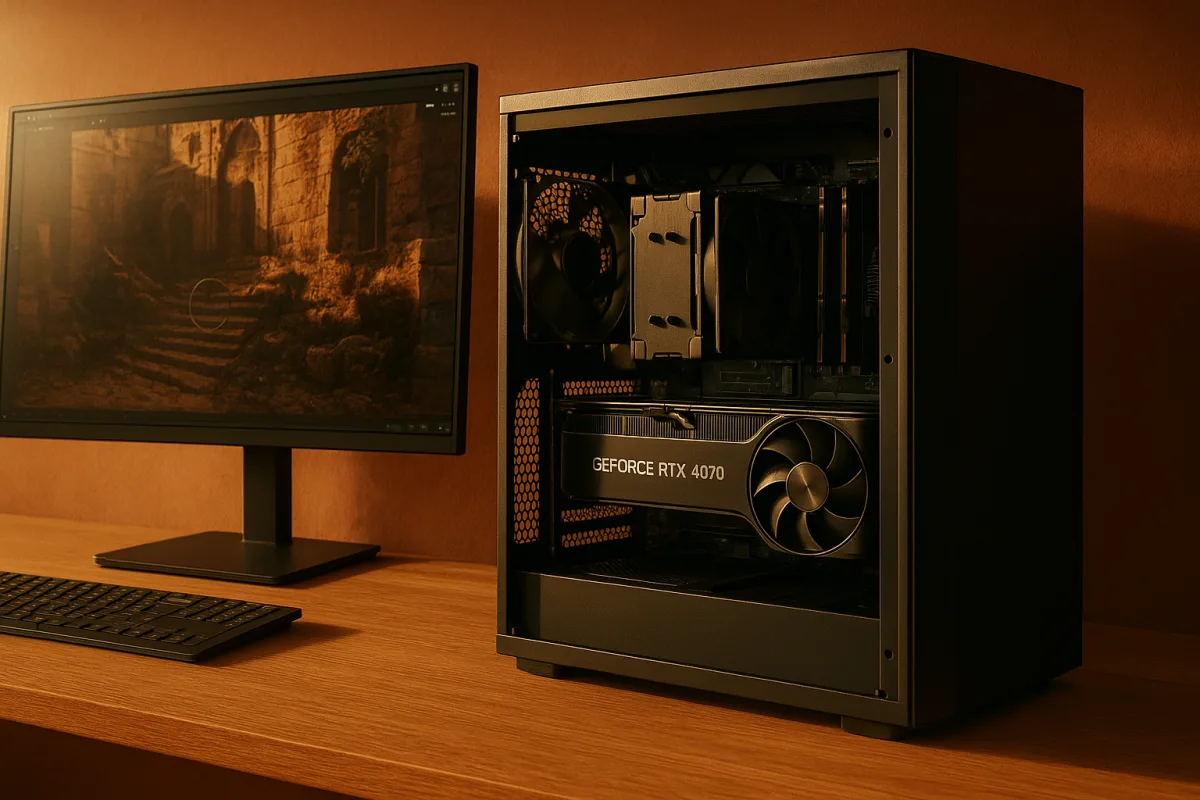
The decision: RTX 4070 Super or RX 8900 XTX?
For previewing renders in Marmoset Toolbag 4, we would choose between the NVIDIA GeForce RTX 4070 Super and AMD Radeon RX 8900 XTX according to scene scale, not brand loyalty. Both are credible real-time rendering choices, but they solve different workstation problems. [1][2]
The RTX 4070 Super is the sensible all-rounder for a freelance artist, student or small studio building a balanced machine around one GPU. The RX 8900 XTX is the better fit when your scenes routinely pressure video memory.
That distinction matters in Toolbag. A polished prop preview can be light on hardware, while a hero asset with multiple 4K texture sets, ray-traced lighting, decals, dense geometry and several cameras can turn VRAM into the first hard limit.
Marmoset Toolbag 4 officially lists 6 GB of VRAM as the minimum, while recommending 12 GB or more for optimal real-time rendering. That is the baseline for a serious 2026 purchase, not a target to undershoot. [9]
Toolbag’s documentation makes GPU capability the central performance consideration. It supports hardware-accelerated ray tracing on NVIDIA RTX and AMD RX graphics cards, so either manufacturer can run the feature set that matters for look development. [7][9]
The honest complication is price. We found no published stable retail prices for either the RTX 4070 Super or RX 8900 XTX, and current graphics-card pricing is volatile by region and retailer. [4][5]
That means we would not pretend there is a universal price-performance winner. A 2026 Toolbag workstation can range from roughly $800 to $950 at entry level to $2,500 or more at the high end. [6]
Those figures describe the PC build, not a GPU alone. They also do not include a monitor, color-calibration hardware, operating-system license, peripherals, backup storage or the cost of replacing a weak power supply during an upgrade.
Head-to-head comparison
| Criterion | NVIDIA GeForce RTX 4070 Super | AMD Radeon RX 8900 XTX |
|---|---|---|
| Primary role | Balanced real-time rendering GPU for artists who need strong Toolbag performance without building around a flagship-class card. | High-VRAM GPU for larger scenes, heavier texture usage and artists who want more headroom before simplifying assets. |
| Toolbag compatibility | NVIDIA RTX is supported for Toolbag hardware-accelerated ray tracing. [[7]](https://marmoset.co/toolbag/rendering/ "Rendering in Toolbag | 3D Real-Time Physically-Based Rendering") |
| VRAM position | Meets the class of GPU recommended for Toolbag workflows, but buyers should verify the exact card specification before purchasing. Toolbag recommends 12 GB or more. [9] | Listed with 24 GB of VRAM, substantially above Toolbag’s 12 GB recommended target. [[1]](https://craftrigs.com/articles/99-gemma-4-hardware-requirements/ "Gemma 4 Hardware Requirements: VRAM, RAM, and Best GPUs (2026) |
| Large texture sets and complex scenes | Suitable for ordinary prop, material and portfolio work, but offers less stated VRAM headroom than the RX 8900 XTX. | The stronger option where many high-resolution textures, dense assets and complex lighting must remain resident together. |
| Ray-traced previewing | A sound choice for RTX-accelerated Toolbag ray tracing and a balanced generalist workstation. [[7]](https://marmoset.co/toolbag/rendering/ "Rendering in Toolbag | 3D Real-Time Physically-Based Rendering") |
| CPU and RAM requirements | Needs the same supporting platform: 16 GB or more RAM, a high-clock-speed multi-core CPU and fast storage. [8][9] | Needs the same supporting platform. Extra GPU capacity does not compensate for too little system RAM or poor storage. [8][9] |
| Storage pairing | NVMe is worthwhile for large projects, although a SATA SSD can remain adequate for small scenes. [[3]](https://www.diskboard.com/blog/nvme-vs-sata-vs-usb-real-speeds "NVMe vs SATA vs USB vs hard drive: what real drives actually deliver | DiskBoard blog") |
| Budget risk | Usually the more sensible class of choice when the whole workstation budget matters, although no fixed current price is supported by this brief. | More likely to push the build toward high-end spending, particularly when paired with the RAM, SSD capacity and power delivery such a machine deserves. |
| Main weakness | Less VRAM headroom than the 24 GB AMD option when scenes become texture-heavy. | Higher overall build cost is the likely trade-off, and not every Toolbag user needs 24 GB of VRAM. |
| Best fit | Small-to-medium asset work, portfolio rendering, material look development and balanced 3D generalist use. | Hero assets, larger environments, multiple high-resolution texture sets and users prioritizing VRAM capacity over restrained spending. |
GPU first, but not GPU only
The RTX 4070 Super is our default recommendation for someone asking for an optimal Toolbag preview machine without defining an unusually heavy workload. It keeps the focus on the component Toolbag cares about most, while leaving budget for the rest of the workstation.
A real-time renderer is not only drawing triangles. It is also loading meshes, decoding texture data, building scene caches, baking maps and moving files around. A fast GPU cannot make a system feel balanced if every asset import stalls elsewhere.
Marmoset provides no official CPU core-count or clock-speed target. Third-party workstation guidance instead points toward a high-clock-speed, multi-core processor, which is reasonable advice for loading assets and handling baking work efficiently. [8][9]
We would treat that as a practical habit, not a Toolbag rule. Do not spend heavily on extreme CPU core counts just because a workstation specification sheet looks impressive, since the official Toolbag guidance does not establish a precise CPU scaling benefit. [9]
System memory follows the same logic. Toolbag’s minimum is 8 GB of RAM, but 16 GB or more is recommended for smooth previewing and complex scenes. For a new machine, 16 GB is the floor we would specify. [9]
If your pipeline includes Blender, ZBrush, Substance 3D Painter, Photoshop or a browser full of reference beside Toolbag, more memory may be sensible. We found no published exact ideal capacity beyond 16 GB, so avoid presenting 32 GB or 64 GB as mandatory.
Why the RX 8900 XTX changes the decision
The AMD Radeon RX 8900 XTX is the better choice when the GPU memory budget is the actual constraint. Its listed 24 GB of VRAM gives it twice Toolbag’s recommended 12 GB target. [1][2][9]
That does not mean every render becomes twice as fast. VRAM capacity is mainly about what can stay available to the GPU together: texture maps, mesh data, lighting information, render buffers and the other resources needed for an interactive scene.
This is especially relevant to look development. When you are judging roughness breakup, clearcoat response, normal-map intensity or a material’s read under different HDRIs, you want the scene to remain responsive while you make small changes.
The RX 8900 XTX therefore suits artists who regularly keep substantial texture budgets alive. Environment artists, vehicle artists, weapon artists and character artists working with numerous material sets are more likely to benefit than someone presenting one game-ready prop at a time.
Its weakness is not a missing feature. Toolbag supports AMD RX ray tracing hardware. The weakness is economic and practical: additional VRAM only pays back when your work actually uses it, and high-end builds can exceed $2,500. [6][7]
Why the RTX 4070 Super remains the practical pick
The NVIDIA GeForce RTX 4070 Super remains the better decision for users whose work is predominantly individual assets, materials, turntables and modest scenes. It is not the maximum-spec answer, but it is often the more proportionate workstation answer.
That distinction is worth making because “optimal” does not always mean “most expensive.” A clean hard-surface product render with sensible texture resolution, disciplined mesh density and a well-built lighting setup does not automatically require 24 GB of VRAM.
For many artists, the money not spent chasing the largest GPU tier can support a larger SSD, more RAM, reliable backup storage or a better display. We found no published Toolbag-specific monitor performance data, so do not make display claims beyond that.
A display is still part of look development, particularly when judging values and color relationships, but no source here establishes an ideal refresh rate, resolution or color standard specifically for Marmoset Toolbag. Treat monitor selection as a separate research decision.
Storage: useful speed, not magic speed
An NVMe SSD can reach roughly 5,400 MB/s read speeds, compared with around 550 MB/s for SATA SSDs. That difference matters most when large assets and caches are being loaded repeatedly. [3]
We would pair either GPU with NVMe storage if this is a new Toolbag workstation. It is simply the cleaner fit for large scenes, large texture libraries and the general reality of moving between several 3D applications.
Still, this is another area where people overstate the upgrade. For smaller Toolbag projects, a SATA SSD may be entirely sufficient, and we found no published quantification of a universal NVMe performance gain in Marmoset workflows. [3]
Keep at least 100 GB of free storage space available as part of a balanced configuration. Toolbag guidance also recommends SSD storage, alongside a DX12-capable GPU and sufficient RAM. [9]
Compatibility and alternatives worth naming
The NVIDIA GeForce RTX 4060 Ti 16 GB is another listed recommendation, and its 16 GB capacity makes it suitable for buyers prioritizing VRAM over the lowest possible entry price. [1][2] We found no current price, so compare local listings rather than relying on old launch pricing.
The AMD Radeon RX 7900 XTX is also recommended and has 24 GB of VRAM, making it suitable for the same broad category of large-scene, high-texture work as the RX 8900 XTX. [1][2] Again, no reliable current price is supplied here.
The NVIDIA GeForce RTX 5070 needs a special caveat. Market reporting notes examples priced above $2,200, which makes it unsuitable for anyone assuming the latest naming scheme automatically equals sensible value. [4][5]
Intel’s Arc A770 can appear attractive on a specification sheet, but reported Toolbag compatibility issues and GPU errors make it a poor recommendation for a workstation bought specifically to preview client work reliably. [10] We found no published price.
Who each option suits
NVIDIA GeForce RTX 4070 Super
Choose the RTX 4070 Super if you are building a first serious Toolbag workstation, primarily render props or characters individually, and want to reserve budget for 16 GB or more of RAM, a capable CPU and solid-state storage. [8][9]
It suits the 3D generalist who moves between Blender, Substance 3D Painter and Toolbag, where a balanced PC matters more than maximum VRAM. It falls down first when large scenes and texture-heavy look-development work consistently exceed its available memory headroom.
AMD Radeon RX 8900 XTX
Choose the RX 8900 XTX if your Toolbag scenes regularly combine high-resolution texture sets, dense hero assets and ray-traced presentation work, and you would rather buy VRAM headroom than continually reduce texture resolution or split scenes apart. [1][2][7]
It suits environment, vehicle and high-detail asset artists whose work genuinely grows into the extra capacity. It falls down for budget-conscious buyers and modest asset work, where the additional 24 GB-class capability may not produce a visible workflow advantage.
Frequently Asked Questions
What GPU is best for real time rendering in Marmoset Toolbag?
The best GPU depends on your scene scale and workload. The NVIDIA GeForce RTX 4070 Super is a balanced choice for freelancers or small studios needing strong performance without flagship costs. For larger scenes with heavy textures and VRAM demands, the AMD Radeon RX 8900 XTX is better suited due to its larger 24 GB VRAM.
How much VRAM do I need for Marmoset Toolbag 4?
Marmoset Toolbag 4 requires a minimum of 6 GB VRAM, but 12 GB or more is recommended for optimal real-time rendering. Choosing a GPU with at least 12 GB VRAM helps handle complex scenes, textures, and ray-traced lighting more effectively.
Is RTX 4070 Super good for Marmoset Toolbag?
Yes, the RTX 4070 Super is a sensible all-round GPU for Marmoset Toolbag 4. It supports hardware-accelerated ray tracing and meets the recommended VRAM class for balanced workflows, making it suitable for freelance artists, students, or small studios.
Should I choose AMD RX 8900 XTX for Marmoset Toolbag?
Choose the AMD RX 8900 XTX if your projects involve large scenes, multiple high-resolution texture sets, and you need substantial VRAM headroom. Its 24 GB VRAM greatly exceeds the recommended minimum, making it ideal for demanding look development and asset complexity.
What are the recommended CPU and RAM specs for Marmoset Toolbag?
Marmoset Toolbag 4 benefits from a high-clock-speed, multi-core CPU to efficiently handle asset loading and baking. At least 16 GB of system RAM is recommended to ensure smooth previewing and performance with complex scenes.
How we researched this
This article was assembled from 10 cited references.
Nothing here is based on hands-on testing. Where a figure or finding appears, it belongs to the source cited beside it, and the writing says so rather than implying otherwise. Every source is listed below so you can check it.
Sources
- Gemma 4 Hardware Requirements: VRAM, RAM, and Best GPUs (2026) | CraftRigs
- PC Hardware Requirements for Real-Time 3D Rendering - TechnoRar
- NVMe vs SATA vs USB vs hard drive: what real drives actually deliver | DiskBoard blog
- Stick it to the PC component crisis and save $1,000 on Alienware's RTX 5070 pre-built gaming desktop with 32GB of DDR5 RAM
- Graphics card price watch: We're tracking the lowest prices and the best GPU deals for Nvidia, AMD, and Intel cards
- Cost to Build a PC in 2026: Real Prices | Dave's Computers
- Rendering in Toolbag | 3D Real-Time Physically-Based Rendering
- Signa Computer Workstation for Marmoset Toolbag - Toronto Ontario
- System Requirements - Marmoset Toolbag Documentation
- Re:Intel ARC compatability/GPU error in Marmoset Toolbag app - Intel Community
Related Articles
Blender Cycles vs Eevee Rendering: Key Differences Explained
Explore Blender Cycles vs Eevee rendering to learn when to use each for final images, previews, and real-time workflows in Blender 5.3.
Best Computer Specs for Blender: CPU, GPU, RAM & Storage
Discover the best computer specs for Blender in 2026, including CPU, GPU, RAM, and storage recommendations for optimal 3D modeling and rendering.
Best Hardware Specs for High Poly Sculpting in 2026
Discover the best hardware specs for high poly sculpting, including CPU, GPU, RAM, and storage recommendations for Blender and ZBrush workflows.
Blender Rendering Time Comparison: Engines Explained
Explore Blender rendering time comparisons across various engines like Cycles and Eevee to find the best fit for your projects.