
When to Use Cycles vs Eevee for Rendering in Blender
Learn when to use Cycles or Eevee in Blender based on lighting needs, render speed, and scene complexity for optimal results.
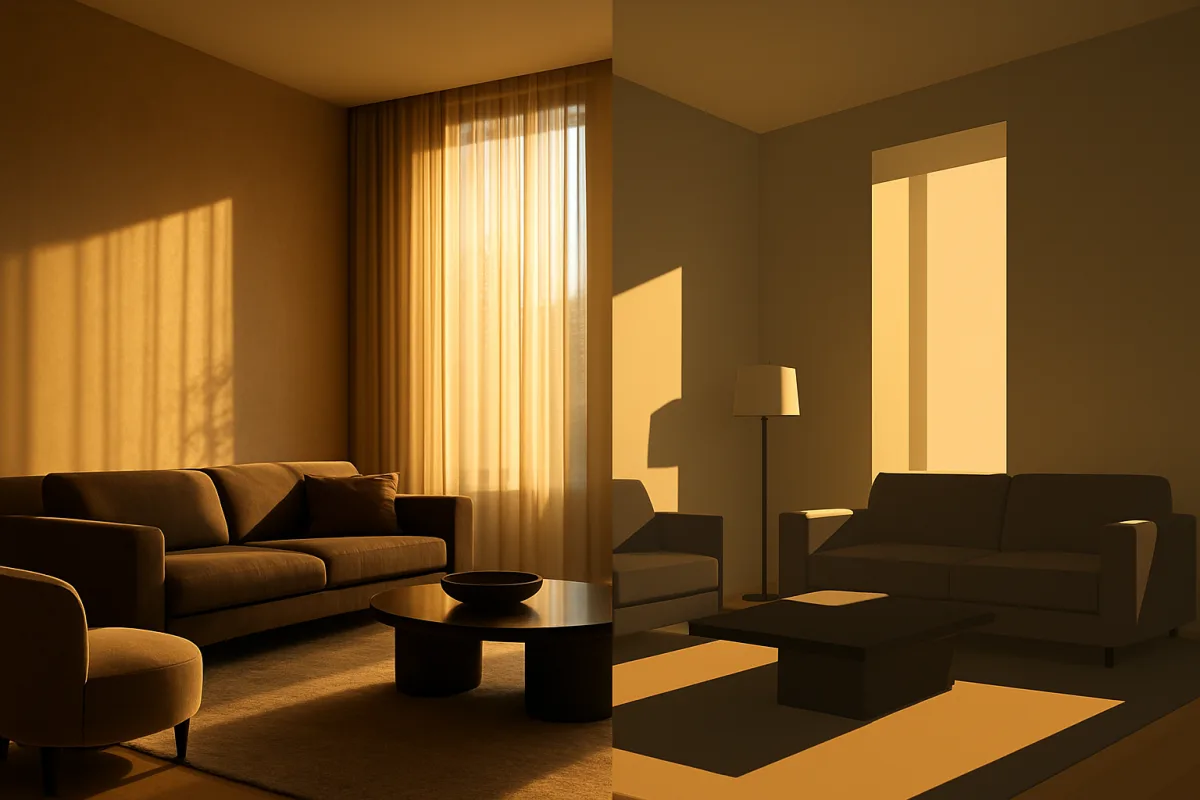
The real choice is how much of the light path matters
Cycles versus Eevee is not fundamentally a choice between “slow realism” and “fast fake rendering.” It is a choice about which parts of a light path the renderer will calculate, and which it will estimate or omit.
That distinction matters because a rendered pixel is rarely just the color of the surface facing the camera. It is the accumulated result of light reaching that surface, bouncing around the scene, passing through material, and eventually reaching the lens.
In Blender 5.2 LTS, Cycles approaches this with path tracing. The renderer traces many possible routes from the camera through the scene, allowing light to bounce between surfaces and interact with volumes and translucent materials.[3][5]
Eevee takes a different route. Its foundation is rasterization, a method designed to draw visible surfaces extremely quickly, then supplement them with targeted effects for shadows, reflections, refraction, volumetrics, and ambient lighting.[4][9]
Neither approach is morally superior. The practical question is whether your image depends on light interactions that can be simplified without the audience noticing, or whether those interactions are the image.
What Cycles is actually calculating
Path tracing begins with the camera. For each pixel, Cycles sends rays into the scene, finds what they hit, evaluates the material there, then continues to explore how illumination could have arrived at that point.
A ray may hit a painted wall directly lit by a window. It may also sample light bounced from a wooden floor, then a nearby sofa, before contributing a small amount of warm color to that wall.
That is global illumination, and it is why a well-lit Cycles room can feel coherent before you begin adding cosmetic tricks. The color relationships are produced by the scene’s lights, geometry, and materials influencing one another.[3][7]
The cost is statistical. Cycles does not solve every possible route of light through a scene, because there are far too many. Instead, it samples a manageable number of paths and progressively converges toward an answer.
This is why render time depends so heavily on the shot. A simple exterior in open daylight may resolve quickly, while a dark interior with glossy furniture, fog, and a translucent lampshade asks for many difficult light paths.
Multiple scattering is where the distinction becomes especially clear. In a volume such as smoke, light can scatter, change direction, scatter again, and still eventually reach the camera. Cycles can model these repeated interactions.[3][8]
The same principle applies to subsurface scattering. Skin, wax, milk, leaves, and certain plastics do not only reflect light from their surface. Some light enters, travels beneath the surface, and exits somewhere nearby.
For a close product render of frosted plastic, or a character portrait where skin must hold up under soft key lighting, Cycles is normally the safer final-render engine because its lighting model supports these interactions more completely.[3][6]
That does not mean every Cycles render is automatically photorealistic. Bad scale, implausible roughness, weak reference, or a light placed without intent will still produce a poor image. Physical capability is not artistic judgement.
What Eevee chooses not to solve
Eevee is fast because it does not attempt to trace the same open-ended web of light paths. It draws what the camera can see efficiently, then uses approximations to supply the cues viewers associate with finished lighting.[4][9]
Screen-space effects are an important example. They use information already visible in the camera image. This can look convincing until a reflection needs an object outside the frame, behind another object, or otherwise absent from screen data.
That is not a minor technical footnote. A chrome kettle reflecting a kitchen, a glazed ceramic piece beside a bright window, or water reflecting an off-camera ceiling can reveal the limit immediately.
Eevee also uses light probes to help provide environment and indirect-light information. They are useful tools, but they are not a full substitute for Cycles calculating each relevant bounce of light through the current scene.[7][10]
Think of the probe as a stored lighting description for a region, rather than a live accounting of every path between every surface. It is an efficient compromise, particularly when the camera moves and a deadline is real.
Volumetrics expose another boundary. Eevee supports single-scattering volumetrics, which can be enough for readable light shafts, stylised haze, and many preview needs. Its limits become more visible with dense, layered, or strongly lit fog.[8][9]
The Blender Manual notes further restrictions around volumetric shadows and surface interactions. Eevee’s volumetrics and subsurface effects also do not receive the same reflection and refraction treatment available in a path-traced solution.[8]
So, use Eevee for atmosphere when atmosphere is supporting the shot. Be cautious when the volume itself is the subject, such as a close-up of clouded glass, thick smoke wrapping a light source, or a cinematic underwater scene.
Caustics are another reasonable warning sign. Concentrated patterns of light through glass or water depend on difficult transport paths. Cycles is built for that category of problem, while Eevee should not be expected to reproduce it faithfully.[3][4]
The cost is not one render-time number
You will find comparisons quoting dramatic differences, including one volumetric example reported as 5 minutes 10 seconds in Cycles and 24 seconds in Eevee.[5] Read that as an illustration of the trade-off, not a universal benchmark.
Render time changes with resolution, samples, light count, texture size, GPU, driver, denoising, transparent layers, hair, volume density, material roughness, and the particular camera angle. There is no honest average that settles the choice.
More importantly, a fast Eevee render can become expensive if you spend hours compensating for a lighting mismatch that Cycles would naturally resolve. Conversely, a physically complete Cycles setup is wasteful for a shot needing only quick approval.
For animation, this distinction is often clearest. Eevee is excellent for checking timing, silhouettes, camera movement, and broad lighting intent while changes are still frequent. Real-time feedback keeps decisions connected to the image.[4][6]
For a final still or a hero sequence, ask whether the audience will inspect materials and lighting. If the answer is yes, Cycles’ slower iteration can be a sensible production cost rather than a technical indulgence.
Build materials for the engine that will show them
A Principled-style material is not a guarantee of identical output between engines. The same base color, metallic value, and roughness map can read differently because the engines supply different lighting and reflection information.
In Blender 5.2 LTS, start by establishing the material’s physical intent, then judge it under the intended engine and lighting. Do not tune a surface under Eevee and assume its Cycles version needs no revision.
With Eevee, light probes may need deliberate placement so reflective objects have usable environmental information. Shadow softness can also require adjustment, because the visual result is shaped by Eevee’s approximations rather than unrestricted path tracing.[7][10]
It is normal to maintain small engine-specific branches in a shader setup. That is not cheating, and it does not mean the texture set is wrong. It means the renderer is part of look development.
The research here does not establish that topology, sculpting, UV work, or texturing fundamentally change between Cycles and Eevee. Good normals, sensible smoothing, adequate texture resolution, and believable surface response remain useful in either engine.
What changes is which flaws the renderer exposes. A path-traced close-up may make roughness variation, normal-map scale, and thin translucent edges more obvious. Eevee may instead demand attention to probes, screen-space failures, and shadow presentation.
Hardware can reverse your first impression
A common mistake is evaluating Cycles on the CPU, then calling it unusably slow. Cycles benefits strongly from supported GPU acceleration, including current NVIDIA hardware using OptiX or Vulkan pathways and recent AMD GPU support.[1][5]
Check that Blender is actually using the intended compute device before comparing engines. A configuration error is not a rendering-engine comparison. It is a configuration error wearing the costume of a workflow opinion.
Blender 5.2 LTS also added texture caching for Cycles, reducing GPU memory use by up to 80 percent for large textures according to reporting on the release.[1] That matters for texture-heavy scenes that previously pushed memory limits.
Eevee is not exempt from hardware concerns. Vulkan support, introduced from Blender 4.5, can improve performance, but it also raises the importance of current GPU drivers and compatible hardware, particularly on older Windows and Linux systems.[5][9]
If Eevee behaves unpredictably, crashes, or lacks expected performance, check the GPU and driver requirements before rebuilding your scene. Real-time rendering still has a technical floor, and older hardware is not automatically a safe fit.
Blender 5.3, scheduled for November 10, 2026, is expected to integrate NVIDIA DLSS 4.5 Ray Reconstruction in Cycles for improved viewport performance and image quality.[1] Its practical effect on final rendering remains unproven until release and broad use.
A working decision for production
Use Eevee first when you are finding the shot: blocking a room, testing a camera, checking animation, exploring broad color relationships, or presenting a fast draft where exact glass and fog behaviour are not the decision.
Move to Cycles when light transport becomes the subject: interior bounce light, skin, wax, dense atmosphere, refractive objects, reflective product surfaces, or any scene where off-camera content should still influence the visible frame.
If a client or art director needs stable approval images, render the approval frame in the engine intended for final delivery. Otherwise you risk approving an Eevee look that changes materially when translated to Cycles.
The useful habit is not choosing one engine forever. It is identifying whether the next decision needs speed or a fuller accounting of light, then choosing the renderer whose compromises are least visible in that particular shot.
Frequently Asked Questions
When should I use Cycles instead of Eevee in Blender?
Use Cycles when your scene depends on believable indirect lighting, accurate reflections beyond the camera view, translucent materials, dense fog, or subsurface scattering. Cycles’ path-tracing approach calculates complex light interactions that Eevee approximates or omits, making it the better choice for final renders requiring high realism.
What are the best scenarios for Eevee rendering?
Eevee is best suited for situations where fast feedback is critical, such as animation previews, blocking, and rapid look development. Its rasterization-based method approximates lighting effects to deliver near real-time performance, making it ideal for projects with tight deadlines or iterative workflows.
How do lighting requirements affect choosing Cycles or Eevee?
If your lighting setup relies on global illumination, multiple light bounces, volumetric scattering, or subsurface scattering, Cycles is preferable due to its physically accurate path tracing. Eevee approximates these effects and requires engine-specific adjustments like light probes and shadow softness tweaks, which may not fully replicate Cycles’ lighting quality.
Can Eevee match Cycles lighting quality?
No, Eevee cannot fully match Cycles’ lighting quality. While Eevee supports some real-time ray tracing features such as screen-space reflections and soft shadows, it lacks full physically accurate path tracing. Complex effects like caustics, multiple scattering in volumes, and detailed subsurface scattering are beyond Eevee’s capabilities.
How does render time influence the choice between Cycles and Eevee?
Render time is a significant factor: Eevee renders scenes much faster by approximating light transport, which benefits fast iteration and previews. Cycles requires longer render times due to its sampling of multiple light paths for accuracy, but GPU acceleration and recent hardware support can reduce this gap substantially. The choice depends on whether speed or lighting completeness is more important for your project.
How we researched this
This article was assembled from 10 cited references.
Nothing here is based on hands-on testing. Where a figure or finding appears, it belongs to the source cited beside it, and the writing says so rather than implying otherwise. Every source is listed below so you can check it.
Sources
- 3D artists are so blown away by Blender's latest update, it's hard to believe it's free software
- After more than a week of living and breathing Nvidia's RTX Spark chip, I'm impressed by how much AI, creative and gaming power it packs into such a tiny space
- what is the difference between eevee and cycles in blender
- What is the difference between Eevee and Cycles? | RenderRoute
- Blender Render Settings: Cycles & Eevee Guide (2026)
- Blender Cycles vs Eevee Rendering: Key Differences Explained
- Lighting & Rendering Theory Cycles and EEVEE - Blender Fundamentals 4.5 LTS - Blender Studio
- Limitations — Blender Manual
- EEEVEE - Blender Developer Documentation
- rendering - EEVEE and Cycles render lighting differences - Blender Stack Exchange
Related Articles
Blender Rendering Settings for Animation: Best Practices
Learn the best Blender rendering settings for animation, including Cycles vs Eevee, samples, output formats, and hardware optimization tips.
Best Lighting Techniques for Blender Rendering
Discover the best lighting techniques for Blender rendering using Cycles and Eevee to create realistic, well-shaped 3D models.
Blender Rendering Time Comparison: Engines Explained
Explore Blender rendering time comparisons across various engines like Cycles and Eevee to find the best fit for your projects.
Blender Project Setup for Rendering: Organize and Optimize
Learn how to set up a Blender project for rendering with proper file organization, scale, render engine choice, and output settings for efficient