
Exploring Keyshot's AI Shots: Enhancing Image Creation Workflows

- Authors
- Published on
- Published on
Keyshot's new AI Shots feature promises to revolutionize image creation with its Restyle, Background, and Imagine modes. While Restyle mode allows for exploration of materials and lighting based on 3D geometry, it falls short when it comes to industry-specific materials. The Background mode, on the other hand, struggles with perspective matching and lighting integration, making it challenging to create believable environments. Imagine mode shines in generating backplate images and imperfection maps, but lacks control over framing and seamless texture generation for material work.
Technical issues plague the user experience, with slow startup times and the absence of an autosave feature. Despite the potential of AI tools to enhance Keyshot's capabilities, AI Shots feels more like a glimpse into the future rather than a fully polished tool ready for professional use. The AI's limitations in spatial understanding, material knowledge, and workflow integration highlight the continued importance of traditional techniques in the industry. While AI Shots may offer a glimpse into the potential of AI integration, it currently falls short of replacing established methods in professional image creation.
In conclusion, Keyshot's AI Shots feature presents an intriguing step towards incorporating AI into rendering workflows. However, its current limitations in handling industry-specific materials and technical challenges such as perspective matching and lighting integration underscore the importance of traditional techniques in achieving professional results. Despite the allure of AI-driven tools, Keyshot users may find that relying on stock photography and established texture libraries alongside traditional Keyshot techniques remains the more efficient and predictable route for now. As the technology continues to evolve, it will be interesting to see how AI Shots and similar features develop to address the demands of professional rendering workflows.
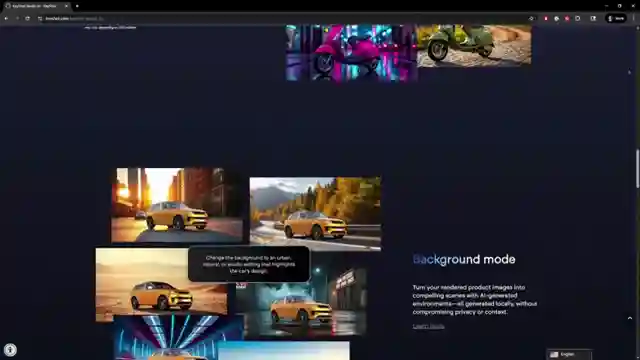
Image copyright Youtube
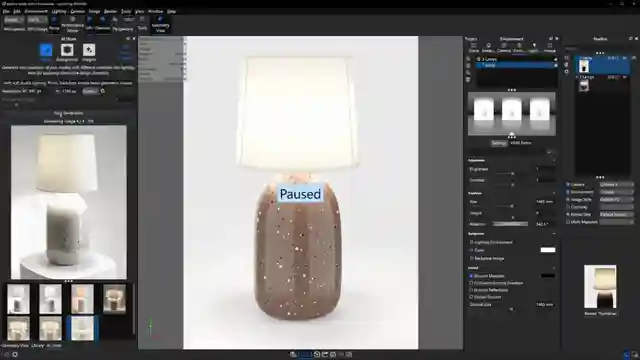
Image copyright Youtube

Image copyright Youtube
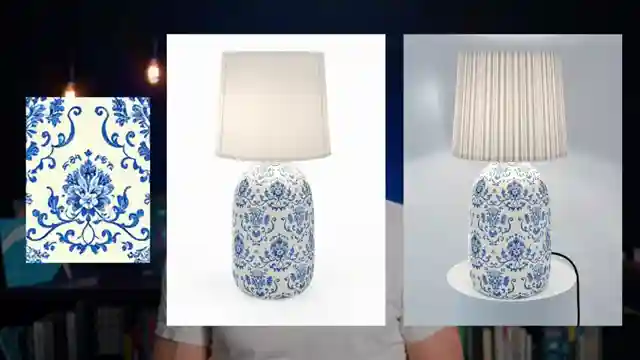
Image copyright Youtube
Watch I Tested KeyShot's New AI Features on Youtube
Viewer Reactions for I Tested KeyShot's New AI Features
Discussion on KeyShot's AI integration and comparison to other AI tools
Concerns about the pricing and value of KeyShot
Comments on the usefulness and effectiveness of the AI tools in KeyShot
Suggestions for more practical and beneficial AI features in KeyShot
Criticism of KeyShot for jumping on the AI trend without fully integrating useful tools
Disappointment with the AI update and its impact on user experience
Speculation on KeyShot's strategy with AI tools and potential investor influence
Comparison of KeyShot to other software with AI features
Concerns about KeyShot's evolution and user experience
Criticism of the CG community's reliance on AI in design and rendering
Related Articles
Mastering Advanced Keyshot Techniques: Rendering a Realistic Bone China Lamp
Learn advanced Keyshot techniques with Will Gibbons as he demonstrates rendering a lamp with bone china porcelain material, adjusting lighting, textures, and materials for a realistic and detailed final product.

Luxury Product Visualization: Keyshot Studio's Planer Light Mastery
Will Gibbons | 3D Rendering showcases using Keyshot Studio's new planer light and positioning tool to create a dramatic luxury product image with organic textures and precise lighting adjustments for a captivating visual narrative.
Mastering Blender: A 100-Day Journey to 3D Rendering Success
Join Will Gibbons as they share their 100-day journey mastering Blender, breaking free from CAD limitations, and unlocking the full potential of 3D rendering and animation. Gain insights on structured learning, mini projects, and staying motivated in this captivating Blender odyssey.
Keyshot 20242 Update: Enhanced Features for Streamlined 3D Rendering
Will Gibbons discusses exciting Keyshot updates in 20242, including a depth slider for textures, automatic material switching, and enhanced move tool features. These improvements enhance the user experience and streamline the 3D rendering process.